Download MakeItColor
for Windows.
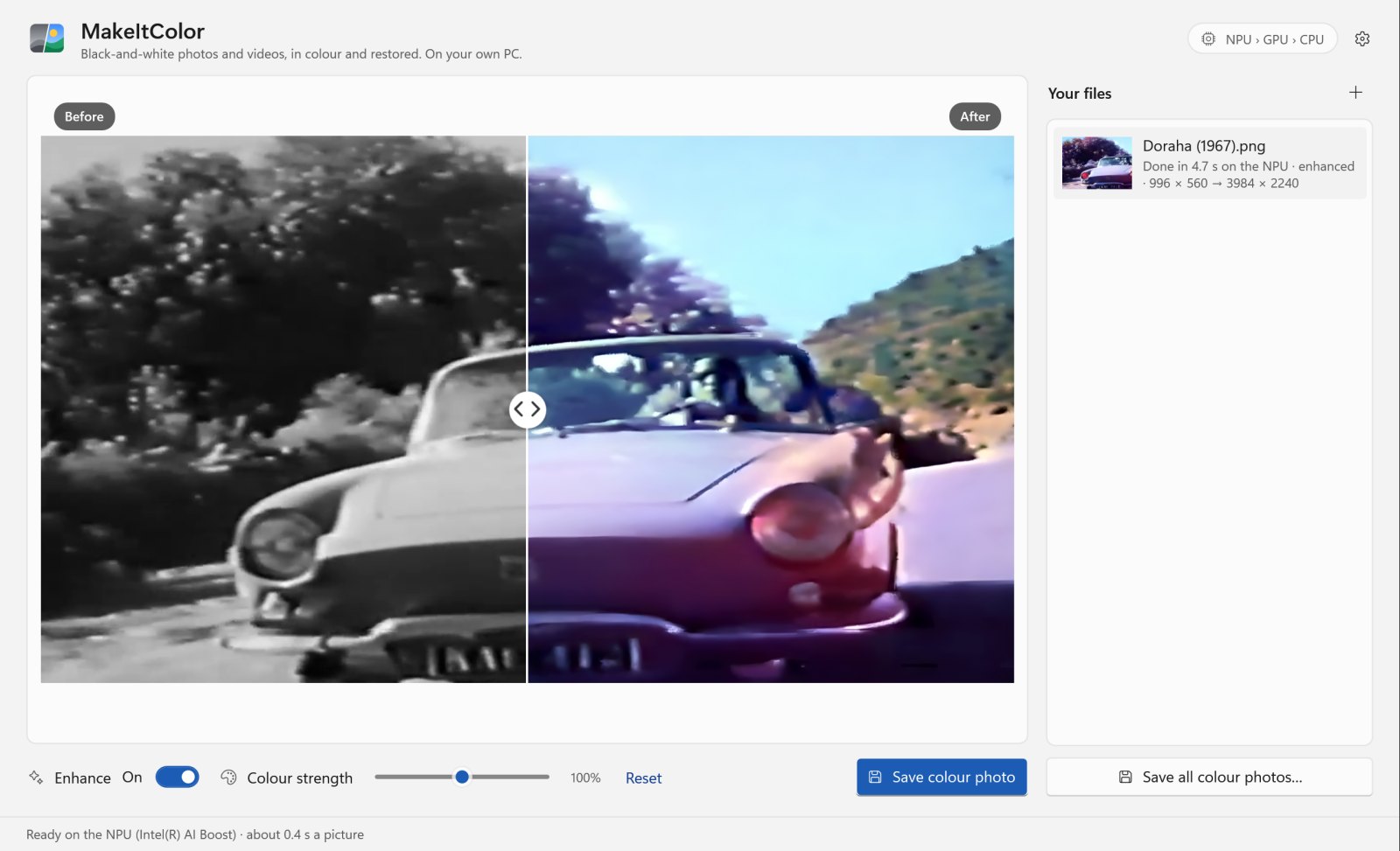
Black-and-white photos and videos, in colour and restored. On your own PC. MakeItColor colours old photos and films, gives faded ones their blacks and whites back, and takes out blur, noise and JPEG damage. Nothing is uploaded, and the originals are never changed.
VERSION 1.0.0RELEASED FREE
Both installers and checksumsOne 512 × 512 pass on my laptop's NPU (Intel AI Boost)
Small photos, with blur, noise and JPEG damage taken out
Your photos and films never leave your PC
Two installers.
Pick yours.
| Windows | Best for | Size | Installer |
|---|---|---|---|
| Windows 10 & 11 · 64-bit | Intel or AMD processor. Most PCs. Self-contained. The colour model downloads on first use. | 111.6 MB | Download |
| Windows 11 & 10 on ARM | Snapdragon laptops and other ARM PCs. Not yet tested on ARM hardware. Self-contained. The colour model downloads on first use. | 93.1 MB | Download |
SHA-256 checksums
- MakeItColor-Setup-1.0.0-x64.exe
3a0d2efe03bda5308c47eb61757eb25fbfef43eeb5b92ae20ced75de4992a58d - MakeItColor-Setup-1.0.0-arm64.exe
4e50f36eea792a901de4cb372d9c4d76456f30c9337f5a67e8e0d82a3171247a
Which one do I need?
Open Settings › System › About. If the system type says x64-based processor, take the first installer; ARM-based, the second. The installers are hosted on the GitHub release page, with a checksums file.
What it
runs on.
- Windows 10 & 11
- 64-bit Windows 10, version 1903 or later, or Windows 11, on an x64 or ARM64 PC. Self-contained: nothing else to install.
- Chips
- Any PC works. The NPU is used first if there is one, then the best graphics card, then the CPU. Each chip is checked with a test picture before it’s used.
- Disk and internet
- About 1 GB free. The colour model downloads once, the first time it’s needed: 456.4 MB for an NPU or graphics card, 912.1 MB for the CPU, each checked against its SHA-256. The enhancer (2.4 MB and 4.9 MB) comes with the app.
- HEIC photos
- Need Microsoft’s HEIF Image Extensions: Windows reads them, not the app.
- 32-bit, Windows 7 & 8.1
- Not supported: Windows ML, which runs the models, doesn’t exist there.
- Installation
- For all users (needs administrator permission) or only for you (no administrator rights needed).
I tested it on my Windows 11 laptop (Intel Core Ultra 5 135U), where the NPU, the Intel graphics and the CPU all ran both models. The ARM64 edition is built natively for ARM, but I haven't run it on ARM hardware (Snapdragon X) yet. AMD and Qualcomm NPUs, NVIDIA and AMD graphics cards, and Windows 10 itself are untested too.
Colour it.
Restore it.
- 01
Colours photos and videos
Photos in JPEG, PNG, TIFF, BMP, GIF, WebP, HEIC/HEIF, JPEG XR; videos in MP4, MOV, MKV, AVI, WMV, WebM, MPEG, M2TS/TS, FLV, 3GP, OGV, VOB, MXF. Drop files or a whole folder, or choose them.
- 02
Full size, full detail
The colour model works on the picture’s lightness at 512 × 512; the colour is then enlarged and lined up with the edges, so the result keeps the original’s full resolution.
- 03
Fixes brightness and contrast
Faded and dull pictures get deep blacks and clean whites again. In videos it also takes out the flicker of old film.
- 04
Enhances photos
A small model (Real-ESRGAN) takes out blur, noise and JPEG damage, and makes photos under 2000 pixels 2× or 4× larger.
- 05
Cleans up and steadies films
Full clean-up runs the enhancer on every frame; Light takes out grain on any CPU. Steady colours keeps colours from flickering where the picture doesn’t change.
- 06
You stay in charge
A before/after divider, a colour strength slider from 50 % to 150 %, and every result saved as a new file: PNG, JPEG or H.264 MP4. The originals are never changed.
Plausible colours.
Not a record.
MakeItColor can't know what colour anything really was. Skies, skin and grass usually come out right; clothes, cars and painted walls are a guess, and a dark shot can get a colour cast. In videos, colours are kept steady only where the picture doesn't change, so something that moves can shift colour. At 4×, the enhancer can make fine textures such as rocks and leaves look slightly painted.
It's fastest with an NPU or a graphics card. On my laptop, a 1500 × 1000 photo enhanced to 3000 × 2000 and coloured takes about 3 s with the enhancer on the graphics card, and about 50 s on the CPU alone. The first time, the Intel NPU takes about 4–5 minutes to prepare the colour model; meanwhile the app works on the graphics card.
Easy to install.
Easy to remove.
- Download the installer for your PC. Use the recommended download above, or pick one from the list.
- Open it. The installers aren't code-signed yet, so Windows SmartScreen may show “Windows protected your PC”. Choose More info, then Run anyway. Compare the SHA-256 checksum first if you'd like to be sure the file is the one I published.
- Choose who it's for. All users (needs administrator permission) or only you (no administrator rights needed).
- Drop in a photo or a video. The first time, the colour model downloads once (456.4 MB for an NPU or graphics card, 912.1 MB for the CPU).
MakeItColor keeps itself up to date. About 10 seconds after it starts, and at most once a day, it reads a small file from this site, https://www.nomanshafiq.com/updates/makeitcolor.json, with an ordinary web request; nothing about you or your pictures is sent. If there's a newer version, Update now downloads it, checks its size and SHA-256 checksum, installs it and restarts the app. Turn the check off in Settings › Updates.
To remove it, uninstall it from Settings › Apps. That deletes the downloaded models and the NPU's compile cache in %LOCALAPPDATA%\MakeItColor; your settings stay in %APPDATA%\MakeItColor.
Curious how
it works?
I wrote about the 1967 song that started it, how the colour is put back on the full-size picture, the speed on each chip, the bugs the tests caught, and what it still gets wrong. There's a 75-second launch video, too.
MakeItColor colours with the MakeItColor model, based on DDColor (Apache 2.0), and enhances with Real-ESRGAN (BSD 3-Clause; network from BasicSR, Apache 2.0). It uses Windows ML and ONNX Runtime (MIT) and FFmpeg (LGPL 2.1, an unmodified BtbN build). It is not affiliated with the DDColor or Real-ESRGAN authors. The image above is a real screenshot of the app.