Download Trove
for Windows.
A free archive manager for Windows with a Windows 11 look, built on the official 7-Zip engine. Open ZIP, 7Z, RAR, TAR, ISO and many more, browse them like a folder, and make ZIP and 7Z archives with AES-256 passwords in a click.
VERSION 1.0.0RELEASED FREE
Other Windows versions and checksumsWindows 7 SP1, 8.1, 10 & 11 · x64, ARM64 and 32-bit
Round trips, passwords, split archives, zip slip and RAR samples, on .NET 10 and .NET Framework 4.8
The official, unmodified 7z.dll, for x64, x86 and ARM64
Every installer.
Pick yours.
| Windows | Best for | Size | Installer |
|---|---|---|---|
| Windows 10 & 11 · 64-bit | Intel or AMD processor. Most PCs. Self-contained. Nothing else to install. | 45.4 MB | Download |
| Windows 11 & 10 on ARM | Snapdragon laptops, Surface Pro X and other ARM PCs. Self-contained. Nothing else to install. | 39.9 MB | Download |
| Windows 10 · 32-bit | Older PCs running a 32-bit installation of Windows 10. Self-contained. Nothing else to install. | 41.4 MB | Download |
| Windows 7 SP1 & 8.1 | Older PCs, 32- or 64-bit. Uses Microsoft .NET Framework 4.8 (setup tells you if it is missing). Installs the 32- or 64-bit 7-Zip engine that matches Windows. | 3.8 MB | Download |
SHA-256 checksums
- Trove-Setup-1.0.0-x64.exe
d76bff1b3d29131cfce2b2586cc46ed8502c868fdd73cbfc55daf90577356482 - Trove-Setup-1.0.0-arm64.exe
e6b8cccd880aae217ed2581a79c67c19b002ef59c53a7af004b56787652ac84c - Trove-Setup-1.0.0-x86.exe
b2b7abae990cffb1e5508d5c94cd97354da2e05b999f11a6acf0dce68f9c8c3a - Trove-Setup-1.0.0-win7-8.exe
d8e4126ae0fc46fa6c05b75e59b63333cbf36a19ab81ba6db7128c7cfac03ea0
Which one do I need?
Open Settings › System › About on Windows 10 or 11, or Control Panel › System on Windows 7 and 8.1. It shows your Windows edition and system type. Most PCs need the first installer. Windows 8 needs the free update to 8.1 first. Windows XP and Vista aren't supported.
What it
runs on.
- Windows 10 & 11
- x64 or ARM64, plus 32-bit Windows 10. Self-contained: nothing else to install. Each installer carries the 7-Zip engine for its processor.
- Windows 7 SP1 & 8.1
- 32- or 64-bit. Uses Microsoft .NET Framework 4.8. If it’s missing, setup tells you and offers to open Microsoft’s download page. Setup installs the 32- or 64-bit 7-Zip engine that matches Windows.
- Windows 8
- Needs the free update to Windows 8.1 first.
- Windows XP & Vista
- Not supported. Trove needs Windows 7 Service Pack 1 or newer.
- Installation
- For all users (the default; needs administrator permission) or only for you (no administrator rights needed).
The 85 engine tests pass on .NET 10 (64-bit) and on .NET Framework 4.8 as a 64- and a 32-bit process. I ran the 64-bit, 32-bit and Windows 7/8.1 (.NET Framework) builds on my Windows 11 PC, and installed and uninstalled for one user cleanly. The ARM64 edition is built natively for ARM, but I haven't run it on ARM hardware yet. I haven't run any build on an actual Windows 7 or 8.1 machine, or tested the all-users installation yet.
Every archive.
One tidy app.
- 01
Opens almost anything
ZIP, 7Z, RAR and RAR5 (including encrypted and multi-part archives), TAR, GZ, BZ2, XZ, ZST, ISO, CAB, WIM, DMG and many more formats the 7-Zip engine reads, plus split archives (.001) and self-extracting .exe archives.
- 02
Browse it like a folder
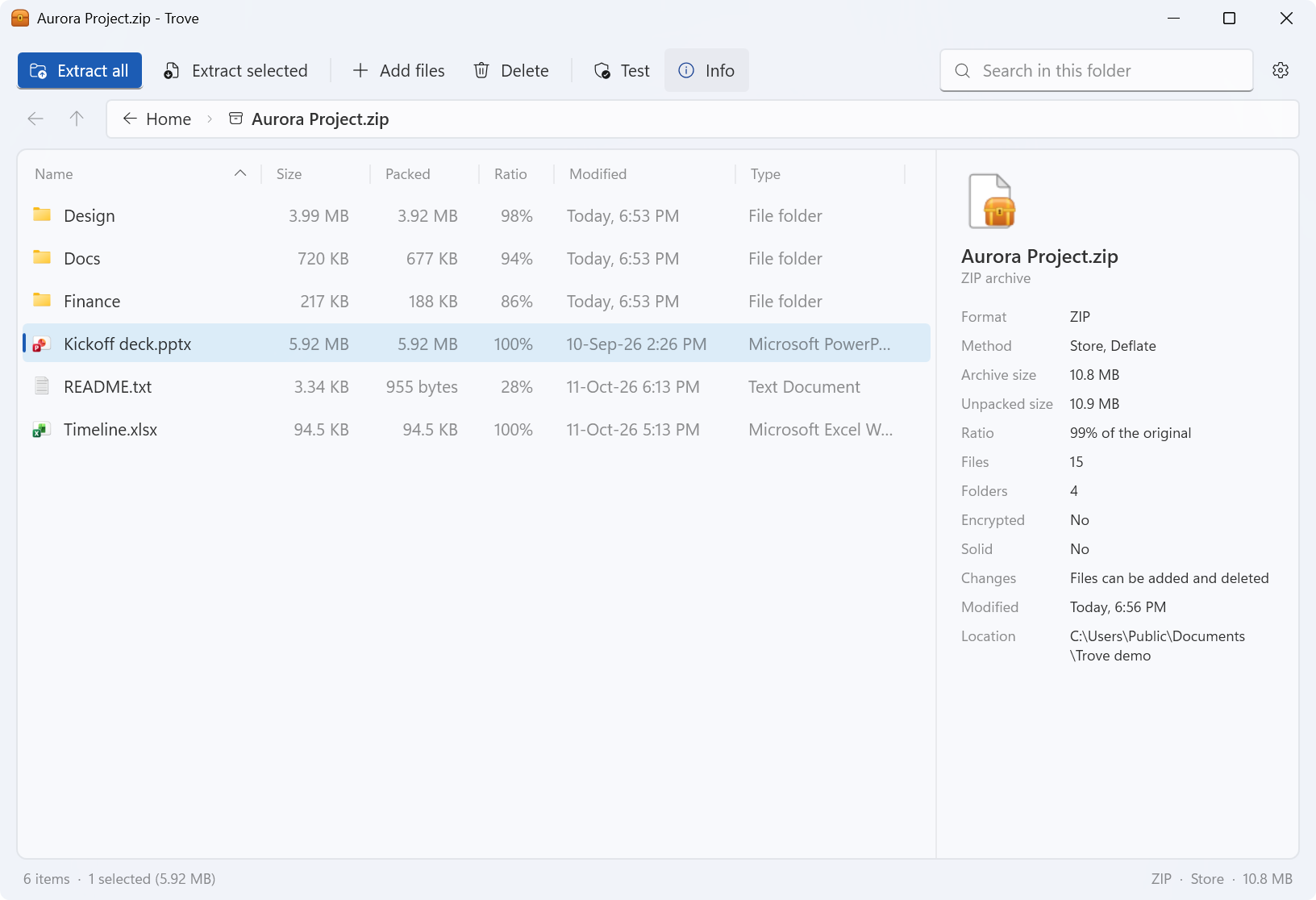
Folders, a breadcrumb, Back and Up, search, Windows’ own icons and an Info pane. Double-click opens a file with its usual app, and Trove asks before running a program. Add and delete files inside ZIP, 7Z and TAR archives.
- 03
Makes ZIP, 7Z and TAR
ZIP, 7Z, TAR, TAR.GZ, TAR.XZ, with four simple levels: Store, Fastest, Balanced and Smallest (7-Zip levels 0, 1, 5 and 9). RAR archives can be opened and extracted, but not created: the format is proprietary.
- 04
Passwords and parts
AES-256 for both ZIP and 7Z, “Hide file names too” for 7Z, and splitting into 100 MB, 700 MB (CD), 4 GB (FAT32 USB drive) or custom-sized parts.
- 05
Safe extraction
Entries that try to leave the folder you chose (“zip slip”) are blocked and listed, links are never created, files are only put in place once their data checks out, nothing is overwritten without asking, and files from the internet keep Windows’ “downloaded” mark.
- 06
A right-click menu
Compress to ZIP file, Compress to 7Z file, Add to archive…, Extract here, Extract to a new folder and more. Several selected files make one archive. On Windows 11 the menu is under “Show more options”.
- 07
Keeps itself up to date
About 10 seconds after it starts, then at most once a day, Trove checks this site for a new version. Update now downloads the installer for your edition, checks its size and SHA-256 checksum, installs it and starts Trove again. Switch it off in Settings › Updates.
Easy to install.
Easy to remove.
- Download the installer for your PC. Use the recommended download above, or pick one from the list.
- Open it. The installers aren't code-signed yet, so Windows SmartScreen may show “Windows protected your PC”. Choose More info, then Run anyway. Compare the SHA-256 checksum first if you'd like to be sure the file is the one I published.
- Choose who it's for. All users is the default and needs administrator permission; only for you needs no administrator rights.
- Pick the extras. Trove in Open with for archives and the right-click menu in File Explorer (both ticked), and a desktop shortcut.
To make Trove the app that opens your archives, right-click one, choose Open with › Choose another app › Trove and tick Always. On Windows 11, the right-click commands are under Show more options. Installing a newer version, or another edition, replaces the one you have and keeps your settings.
You won't need to do that by hand, though. Trove looks for a new version about 10 seconds after it starts and at most once a day, and Update now installs it over the one you have, then starts Trove again. If it's installed for all users, Windows asks for permission first. The check only downloads a small file from this site, https://www.nomanshafiq.com/updates/trove.json, with an ordinary web request; nothing about you or your files is sent. You can turn it off, or check yourself, in Settings › Updates.
To remove Trove, uninstall it from Settings › Apps. That removes its files, menu entries and file-type registrations; your settings and recent archives stay in %APPDATA%\Trove in case you come back.
Curious how
it works?
I wrote about why I built Trove, how it keeps extraction safe, what the right-click menu does, and what it took to talk to the 7-Zip engine directly from one app that runs on every Windows from 7 to 11.
Trove uses the 7-Zip engine (7z.dll) by Igor Pavlov under the GNU LGPL, with the unRAR licence restriction for the RAR decoder, which is why it can open RAR archives but never create them. Trove is an independent project, not affiliated with or endorsed by 7-Zip, Igor Pavlov or RARLAB.